Free bank reconciliation template (Excel), with a worked example
Published September 1, 2026 · Updated October 14, 2026
A bank reconciliation proves that your ledger's cash account and the bank statement agree for the same month, once deposits in transit, outstanding checks and unbooked bank fees are accounted for. This template is built for exactly that, one bank account per sheet. For a credit card, general ledger, balance sheet or clearing account, use the account reconciliation template for GL and balance sheet accounts instead.
Download the template: bank-reconciliation-template.xlsx: a simple two-sided reconciliation with the totals, adjusted balances and difference already wired up as formulas, plus a second sheet for ticking statement lines off against your ledger. No macros, no sign-up, opens in Excel, Google Sheets and LibreOffice.
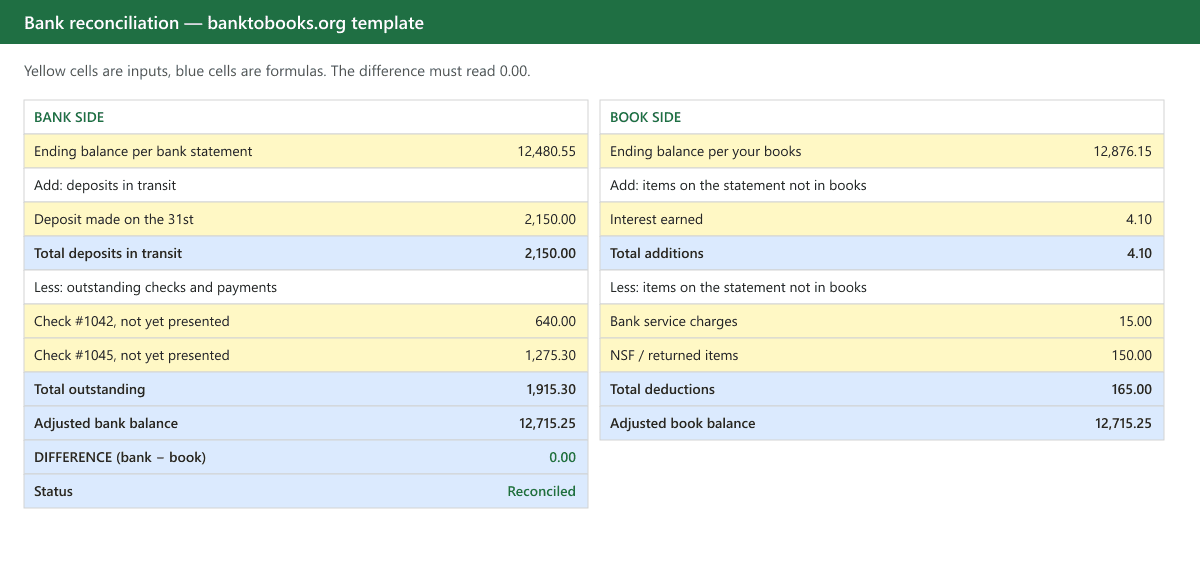
What the bank reconciliation template does
A reconciliation has two columns that must meet in the middle. The template implements exactly that, with yellow cells for inputs and blue cells for formulas:
| Bank side | Book side |
|---|---|
| Ending balance per the statement | Ending balance per your ledger |
| + Deposits in transit (recorded by you, not yet on the statement) | + Interest, direct customer payments, other items the bank recorded first |
| − Outstanding checks and payments (issued by you, not yet cleared) | − Bank charges, NSF items, automatic payments you haven't booked |
| ± Corrections for errors in your own entries | |
| = Adjusted bank balance | = Adjusted book balance |
The last row subtracts one adjusted balance from the other. When that cell reads 0.00 the account is reconciled; the status cell says so. Everything the book side adds or subtracts is also a journal entry you still owe your ledger: that's the point of listing them rather than just forcing the number.
How to use it, step by step
- Enter the two ending balances: the statement's closing balance on the bank side, your ledger's balance for the same date on the book side.
- Tick off the statement against the ledger. Every line on the statement should match a line in your books. The second sheet exists for this: paste the statement's transactions in, mark each one Y when you find it in the ledger, and the sheet counts and totals what's left.
- Statement lines with no ledger match go on the book side: fees, interest, returned items, a direct debit you forgot. They are real, the bank already processed them, and your books are wrong until they're entered.
- Ledger lines with no statement match go on the bank side: checks you wrote that haven't been presented, a deposit made after the cutoff. They are timing differences, not errors, and should clear on the next statement. One that doesn't clear for months is a question, not a timing difference.
- Read the difference cell. Zero means done. Anything else means step 2 missed something: see below for how to find it fast.
When it won't go to zero
The difference itself usually tells you where to look:
- Equals one transaction amount: that transaction is on one side only. Missing entry or a duplicate.
- Divisible by 9: a transposition. 1,254 entered as 1,245 produces a difference of 9; transposed hundreds produce 90 or 900.
- Exactly twice an amount: the item was posted on the wrong side: a deposit entered as a payment, or vice versa. Credit-card statements are the classic source, because their sign conventions are inverted.
- An odd amount that matches nothing: usually two or more small errors stacked. Go back to the tick-off sheet and work through the unmatched lines in date order.
- The same difference every month: the opening balance was wrong. Reconcile the earliest period you can and carry forward.
A worked example
The same month, filled in. The statement closes at $12,480.55; the ledger says $12,876.15. Neither is wrong yet: they just haven't seen the same things.
| Bank side | Book side | ||
|---|---|---|---|
| Ending balance per statement | 12,480.55 | Ending balance per ledger | 12,876.15 |
| + Deposit made on the 31st, in transit | 2,150.00 | + Interest credited | 4.10 |
| − Check #1042, not yet presented | (640.00) | − Monthly service charge | (15.00) |
| − Check #1045, not yet presented | (1,275.30) | − Customer check returned NSF | (150.00) |
| Adjusted bank balance | 12,715.25 | Adjusted book balance | 12,715.25 |
On the first pass the difference cell read 9.00, not zero. Nine divides by nine: a transposition. Check #1045 had been keyed into the outstanding list as 1,284.30. Corrected, the sheet reads Reconciled, and the three book-side lines (interest, the service charge, the returned check) become the month's adjusting entries. Save the file with the statement, and next month's starts from a clean opening balance. Reconciling monthly, against each statement as it arrives, is what keeps the list this short.
Get the bank statement into Excel first
The tick-off in step 2 is where reconciliations go slow, because the bank side is a PDF and the book side is a ledger, and you end up reading one screen and typing into another. Converting the statement into rows first turns that into a sort-and-match job. Our bank statement converter does the conversion and then runs the same arithmetic this template does, it checks that the extracted rows actually add from the printed opening balance to the printed closing balance, so the numbers you paste into the second sheet have already been reconciled against the statement before you compare them to the books. For a QuickBooks account, the same rows can go in as a .qbo bank feed instead of a paste.
A few conventions worth keeping
- Reconcile every statement, in order, even the boring ones: a skipped month hides errors in the next.
- Save each finished reconciliation with the statement it belongs to. A year later, "why is this check still outstanding" is answerable only if the working papers exist.
- Book the adjustments the same day you find them. A reconciliation that balances on paper but not in the ledger hasn't happened yet.
- If you handle several clients, keep one file per client per account: write-up shops that reconcile dozens of accounts a month live or die by that filing discipline.
Reconciling inside QuickBooks Online rather than in a spreadsheet? The same logic applies on its reconcile screen: see how to reconcile a bank statement in QuickBooks Online, including what to do when the difference won't reach zero.
Questions people ask
- What is a bank reconciliation?
- It's the check that your books and the bank agree about the same account over the same period. You take the bank's ending balance, adjust it for items the bank hasn't seen yet (deposits in transit, outstanding checks), take your book balance, adjust it for items you haven't recorded yet (fees, interest, NSF items), and the two adjusted figures must be equal.
- How often should I reconcile?
- Monthly, against each statement, is the standard for any business account: that's the cadence the statement itself gives you. Firms handling many clients often reconcile weekly from the bank feed and then confirm against the statement when it arrives. The longer the gap, the more items pile up and the harder a difference is to trace.
- The difference isn't zero. What's the fastest way to find it?
- Work from the size of the difference. If it equals one transaction, that item is missing or duplicated on one side. If it divides evenly by 9, a digit was transposed. If it's exactly double an item, the item was posted to the wrong side. Otherwise tick off statement lines against the ledger one by one, which is much faster when the statement is a spreadsheet instead of a PDF.
- Is there free bank reconciliation software for Excel?
- Excel has no reconciliation feature of its own, so in practice the free option is a template like this one: the formulas do the arithmetic and you do the matching. The slow part is getting the statement into rows. A bank statement converter that outputs Excel removes the retyping; ours has a free monthly allowance and checks the rows against the statement's printed balances before you paste them in.
- Can I use this template with QuickBooks or Xero?
- Yes, as a standalone check or a working paper. Both products have their own reconciliation screens, and the template is useful precisely when those don't balance: it lays out the adjustments explicitly so you can see which side the problem is on before you touch the books.
This guide is about file conversion and bookkeeping tooling: it isn't tax, accounting, or legal advice. Verify converted data against the source statement before filing or posting it.