Free account reconciliation template (Excel): GL, balance sheet and clearing accounts
Published September 18, 2026 · Updated October 27, 2026
An account reconciliation template ties one general ledger balance to the document that proves it, such as a card statement, an aging report, a lender statement or, for a clearing account, zero, and lists every difference with its age. The same working paper goes by several names: balance sheet reconciliation, GL account reconciliation, or simply a reconciliation template. This one covers all of them in one Excel file.
Download the template: account-reconciliation-template.xlsx, a general ledger reconciliation for any balance sheet account: ledger balance on one side, supporting balance on the other, ten aged reconciling items per side, a difference cell that must read 0.00, preparer and reviewer sign-off, plus a rolling log of open items and a sheet listing which accounts reconcile against what. No macros, no sign-up, opens in Excel, Google Sheets and LibreOffice. If the account you are reconciling is a bank account, the bank reconciliation template is the specialised version with deposits in transit and outstanding checks laid out.
What an account reconciliation is
A general ledger balance is a claim. A reconciliation is the proof: an independent document that says what the balance should be, and an itemised explanation of every difference between the two. The ledger says the company credit card owes $4,812.30; the card statement says $5,102.30; the reconciliation lists the $290.00 charge that posted after the last entry and shows that, once it is booked, the two agree. Done for every balance sheet account at month-end, this is what makes the balance sheet trustworthy: the profit and loss can only be right if the balances it flows into are.
Which accounts, against what
Every balance sheet account with an outside source of truth gets one. The third sheet of the template carries this table; the short version:
| Account | Reconcile against | Typical reconciling items |
|---|---|---|
| Bank / cash | Bank statement | Deposits in transit, outstanding checks, unbooked fees and interest |
| Credit card | Card statement | Charges after the cutoff, payments in transit, disputed items |
| Accounts receivable / payable | The aging report or subledger | Unapplied cash, credit memos not posted, bills received not entered |
| Clearing, suspense, undeposited funds | Zero, or the batch known to be in transit | Payouts never matched to sales, deposits batched but not recorded |
| Payroll liabilities | Payroll provider's liability report | Taxes accrued but not yet debited, provider timing |
| Prepaids, fixed assets | Amortization schedule, asset register | Month's amortization or depreciation not posted, additions not recorded |
| Loans / notes payable | Lender statement | Interest accrued vs paid, principal and interest split on the payment |
| Intercompany | The other entity's ledger | Transactions recorded by one side only, exchange differences |
How the template works
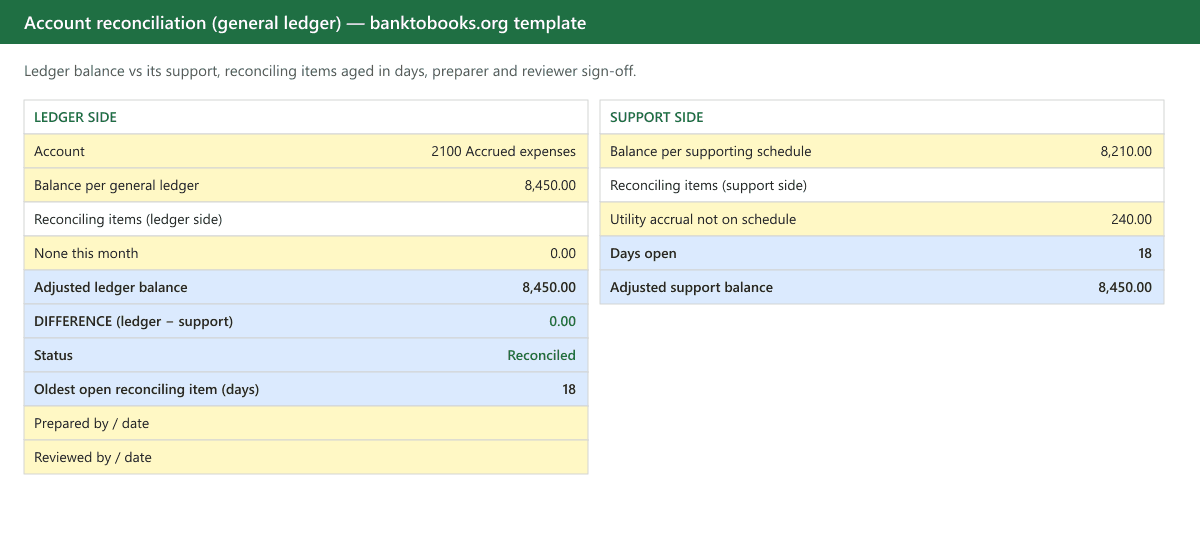
Two sides, mirror images. The ledger side starts from the general ledger balance and lists items that are in the books but not yet in the support. The support side starts from the supporting document's balance and lists items in the support but not yet in the books. Each side nets its items off to an adjusted balance, and the difference between the two adjusted balances must be zero. Three formulas do the rest:
- Days open on every reconciling item, from the item date to the period end. A timing difference is a few days old. A reconciling item that is ninety days old is a problem with a label.
- Oldest open item, so the reviewer sees the age of the worst item without reading the list.
- Journal entries owed: a count of support-side items, because every one of them is an entry the ledger still needs before the balance is actually right.
Yellow cells are inputs, blue cells are formulas, and the preparer and reviewer sign-off sits at the top so the sheet is a working paper as it stands: save one per account per period.
Reconciling a clearing account
A clearing account is a temporary holding account. Money passes through it on the way somewhere else: payroll clearing holds the net pay between the payroll journal and the bank transfer, merchant or payment-processor clearing holds card sales until the payout lands, and undeposited funds holds customer payments until they are grouped into a bank deposit. Every entry into the account should have a matching entry out, so at month-end the balance should be zero, or equal to a batch you can name that is genuinely in transit across the period end.
To reconcile one with the template:
- Set the support side to zero, or to the in-transit batch if one exists, such as card sales from the 31st that pay out on the 2nd.
- Pull the ledger detail for the account and pair each entry in with its entry out: each payroll journal with its funding transfer, each day of processor sales with its payout.
- List every unpaired entry as a ledger-side reconciling item, with its date and cause. The age column matters here: an unpaired entry from three months ago is not timing.
- Post the entry that clears each one. The most common cause is a payout that lands net of fees. If $1,000.00 of sales went into the clearing account and the processor paid out $970.00, the missing $30.00 is the processor fee, and it stays in clearing until it is booked to fees.
A clearing account with a balance that grows every month is a process problem, not a one-off error. Fix the posting rule first, then clean up the balance.
Step by step
- Enter the two balances as of the same date: the ledger balance for the account, and the balance on the supporting document for that date.
- Tick the support off against the ledger detail. For statements, this is line by line; for agings and schedules, it is total by total. Anything without a match on the other side is a reconciling item.
- List ledger-side items with their date: a payment issued but not yet on the vendor statement, a deposit made after the card cutoff. These should clear on their own next period.
- List support-side items with their date: fees, interest, a charge you never entered, a payroll tax the provider drew that isn't in the books. Post these now; they are the reason the ledger is wrong.
- Read the difference. Zero, and the status cell says Reconciled. Anything else is an item you have not found yet: the size of the difference usually says which (see below).
- Carry open items to the log. The second sheet keeps every uncleared item visible period after period, with its cause and the period it finally cleared in. An item that survives three periods gets written off or escalated, not copied forward a fourth time.
When it won't reconcile
- Difference equals one transaction: that transaction is on one side only: missed, or entered twice.
- Divisible by 9: a transposed digit somewhere in an amount you keyed.
- Exactly twice an amount: the item was posted with the wrong sign. Common on credit card accounts, where a payment reduces the liability and a charge increases it, the reverse of a bank account.
- The same difference every period: the opening balance was never right. Go back to the last period that reconciled and roll forward from there.
- A clearing account that never empties: something is being parked in it by a process, not a person: a payment processor's payouts landing without their fee split, or deposits recorded to the account and never moved. Fix the process, then the balance.
Where the statement rows come from
For cash, credit card and loan accounts the support is a PDF statement, and the tick-off in step 2 is where the time goes: reading one document and searching another. Convert the statement into rows first and it becomes a sort-and-match. Our bank statement converter turns a bank or card statement into a spreadsheet and checks that the rows add from the printed opening balance to the printed closing balance before you see them, so the support side is already internally reconciled. For a QuickBooks or Xero account, the same rows can be imported and reconciled on the product's own screen: see reconciling a bank statement in QuickBooks Online. Clearing and undeposited-funds accounts usually trace back to categorization decisions made when the bank feed was first reviewed, which is the place to stop the account filling up again.
Conventions that make it hold up
- Month-end is the standard cadence. High-volume accounts such as bank, receivables and payables are often reconciled weekly or daily from the feed, then confirmed against the month-end support.
- Same date on both sides, always. A ledger balance at the 31st against a statement cut on the 28th is not a reconciliation.
- Preparer and reviewer are different people where there are two people to have. Where there is one, the log is the reviewer.
- Post the support-side entries before you close the period, not after. A reconciliation that balances on paper but not in the ledger has not happened yet.
- File the reconciliation with its supporting document. Next year's question ("why was this still open in March?") is only answerable if the working paper exists.
Questions people ask
- What is the difference between an account reconciliation and a bank reconciliation?
- A bank reconciliation is one kind of account reconciliation: the ledger's cash account checked against the bank statement. An account reconciliation is the same check applied to any balance sheet account: the general ledger balance on one side, whatever independently supports it on the other (a card statement, an aging report, a lender statement, an amortization schedule), with every difference listed and explained.
- Which accounts should be reconciled every month?
- Every balance sheet account with outside support: cash and credit cards against statements, receivables and payables against their agings, payroll liabilities against the provider's report, loans against the lender's statement, prepaids and fixed assets against their schedules, and clearing or suspense accounts against zero. Income and expense accounts are reviewed for reasonableness, not reconciled: they have no independent balance to tie to.
- What counts as a reconciling item?
- Anything recorded on one side and not yet the other. Ledger-side items are in your books but not in the support yet: a check written but not cleared, a bill entered before the vendor statement cut. Support-side items are in the support but not in your books: a fee, interest, a charge after your last entry. Support-side items are journal entries you still owe; ledger-side items should clear by themselves next period.
- How is a clearing or suspense account reconciled?
- Its supported balance is zero, or the specific batch known to be in transit. Anything else in it is a transaction that was parked and never finished: a payout that never matched its sales, a deposit batched but not recorded, a payment applied to the wrong customer. List each one as a reconciling item with its cause, then post the entry that empties the account.
This guide is about file conversion and bookkeeping tooling: it isn't tax, accounting, or legal advice. Verify converted data against the source statement before filing or posting it.